
What’s new in 3.0
3.0 — now on aescripts + aeplugins
Section titled “3.0 — now on aescripts + aeplugins”- Available from aescripts + aeplugins, with a free 14-day trial: type
trialin the licence window. See Licensing & support. - Gumroad licences keep working. Bought it on Gumroad? Nothing changes, and there is nothing to re-activate.
- Fixed: the panel no longer opens blank at startup when a saved layout restores it twice.
New since 2.11
Section titled “New since 2.11”If you are coming from 2.11 or earlier, the panel has been rebuilt. These arrived in 2.12 and are all in 3.0.
Tree-view lists
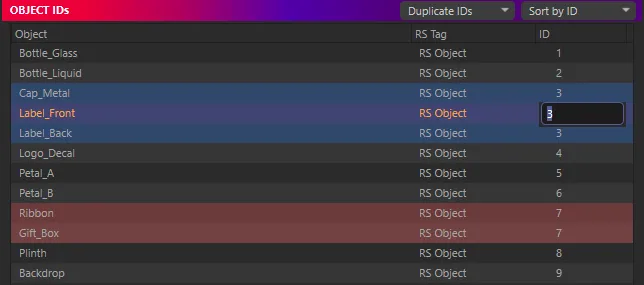
Section titled “Tree-view lists”Both panes are native Cinema 4D tree views: no row limit, smooth scrolling, collapsible groups, and the name column widens with the panel.
- Double-click an ID to edit it in place. With several rows selected, it sets them all.
- Double-click the RS tag name to rename it.
- Double-click the object name to show its RS tag in the Attribute Manager.
- Right-click to select or delete RS tags.
Selection is Cinema 4D’s
Section titled “Selection is Cinema 4D’s”Clicking rows selects the objects or materials in Cinema 4D, and selecting in Cinema 4D highlights the rows. One Set selected to per pane writes an ID to that selection:
- objects without an RS Object tag get one;
- tags with the ID override off are switched on;
- materials include those of selected material tags and, with Select Materials of Active Objects on, of selected objects.
With several items selected, choose one shared ID or unique IDs counting up, skipping IDs already in use. This replaces Set ID for active material. See Selection.
Colours, order and grouping
Section titled “Colours, order and grouping”- Duplicate IDs share a colour in the ID cell.
- Each pane’s row colour menu tints whole rows by duplicate group or by layer.
- Scene Order, Sort by ID or Group by Layer — collapsible, with the layer’s colour and count, and No Layer last.
All remembered between sessions. See Duplicates, colours & order.
- A selection readout in the footer: objects (and how many have no RS tag), RS tags, materials.
- Drag the split between the two panes; it is remembered.
- The title row hides when the panel is squeezed, and comes back when there’s room.
- Edit ▸ Preferences… and Edit ▸ License… in the panel’s menu.
Earlier
Section titled “Earlier”- 2.11 — the Puzzle Matte dialog gained an editable Output path, a token reference grouped
by who resolves each token, and protection against
$passin names. - 2.10 — Compression for direct-output mattes, and an ID of 0 to clear an ID.
- 2.9 — duplicate-ID colours, the Highest ID readouts, and IDs up to 100,000,000.