
Licensing & support
Licensing
Section titled “Licensing”RS ID Manager is sold through aescripts + aeplugins. The easiest way to install and license it is the aescripts + aeplugins manager.
The first time you use RS ID Manager, the licence window asks for your serial number. Paste it in to activate.
The trial
Section titled “The trial”To try RS ID Manager first, type trial in place of a serial number. The trial is the full plugin
for 14 days. When it ends, the licence window appears again the next time you use the panel —
enter a serial to carry on.
Your licence
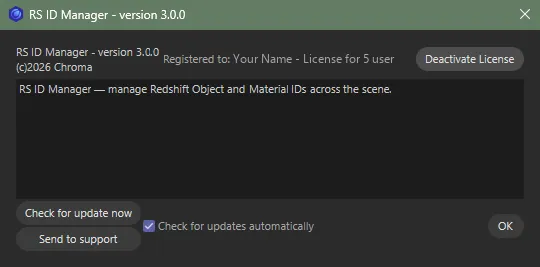
Section titled “Your licence”Click the icon at the left of the panel’s title row, or choose Edit ▸ License… in the panel’s menu, to open the licence window:
- Licensed — it shows Registered to … with a Deactivate License button.
- On a trial, or not licensed — it asks for a serial number.
Moving to another computer
Section titled “Moving to another computer”Deactivate first. Open the licence window on the old computer and click Deactivate License, then activate on the new one with the same serial.
If your licence is deactivated or a trial runs out while the panel is open, the licence window appears. Activate there and you carry on where you were; otherwise the panel closes.
Bought on Gumroad?
Section titled “Bought on Gumroad?”RS ID Manager was sold on Gumroad before it came to aescripts, and Gumroad licences keep working — there is nothing to re-activate.
- The panel’s icon (or Edit ▸ License…) shows Licensed to with your email, the start of your key, and a Deactivate button. Unlicensed, Activate… asks for your Gumroad licence key.
- Gumroad copies show an Update Now button at the top of the panel when a new version is out. It downloads the new version as a zip and asks where to save it; unzip it over your plugin folder and restart Cinema 4D. Copies from aescripts are updated through the aescripts + aeplugins manager instead.
Supported
Section titled “Supported”- Cinema 4D 2024, 2025, 2026 and 2027, with Redshift.
- Windows, and macOS on Apple Silicon. Intel Macs aren’t supported.
Support
Section titled “Support”Questions or problems? Open a support ticket from the RS ID Manager product page on
aescripts.com. It helps to include your Cinema 4D and
Redshift versions, and any lines starting [RS ID Manager] from Cinema 4D’s Console
(Extensions ▸ Console).
RS ID Manager © Chroma Studios Ltd · chroma.london