
Every ID at a glance
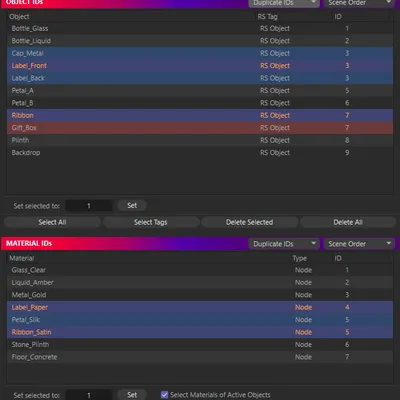
Two lists, one for Object IDs and one for Material IDs, read straight from the scene. Node and legacy Xpresso Redshift materials both appear.
Every ID at a glance
Two lists, one for Object IDs and one for Material IDs, read straight from the scene. Node and legacy Xpresso Redshift materials both appear.
Set IDs on your selection
Select objects or materials anywhere in Cinema 4D, type an ID and click Set. Objects without an RS Object tag get one. Give several items one shared ID, or a unique ID each.
Duplicates stand out
Rows that share an ID share a colour. Colour rows by layer instead, sort by ID, or group them by layer.
Puzzle mattes in one click
Pack every ID into Redshift Puzzle Matte AOVs, three to an AOV, with your own naming and optional per-AOV EXR output. Update them when the IDs change.
RS ID Manager runs in Cinema 4D 2024 to 2027 with Redshift, on Windows and Apple Silicon Macs.